
Best overall for Nigerian and diaspora property owners in 2026: BuildCheck, because it brings progress tracking, construction cost control and quotation analysis into one platform. For a site supervisor focused on assigning field tasks, choose Fieldwire; for a large commercial contractor managing the wider project lifecycle, choose Procore.
- Among the best progress tracking apps for construction sites in 2026, BuildCheck is the best fit for Nigerian owners who also need cost control and quotation analysis.
- Fieldwire is best for field tasks and punch lists; Procore fits larger commercial teams with wider project-management needs.
- Autodesk Build suits drawing-led coordination, while Dashpivot suits structured daily site records.
- Before approving a milestone, match the reported work to the Bill of Quantities and supporting site evidence.
Why this matters
A task marked complete answers a different question from a payment request. The task tells you what someone says happened on site. The payment request asks you to accept a financial claim. If those records are separate, you must reconcile them before you can tell whether the claimed work matches the Bill of Quantities (BOQ).
That distinction is particularly useful for an owner reviewing a Nigerian project from another city or country. You cannot resolve a disputed milestone by looking at a percentage alone; you need to know what was included in the quotation, what work the contractor reports as complete and what evidence supports that report. A quantity surveyor can then review the claim against the priced scope.
The best choice in 2026 depends on which record is missing from your current process. A supervisor without a reliable task list needs a different app from an owner who receives site photos but cannot connect them to amounts claimed. Choose the tool around the decision you need to make, not the number of features on its product page.
What makes the best progress tracking app for construction sites?
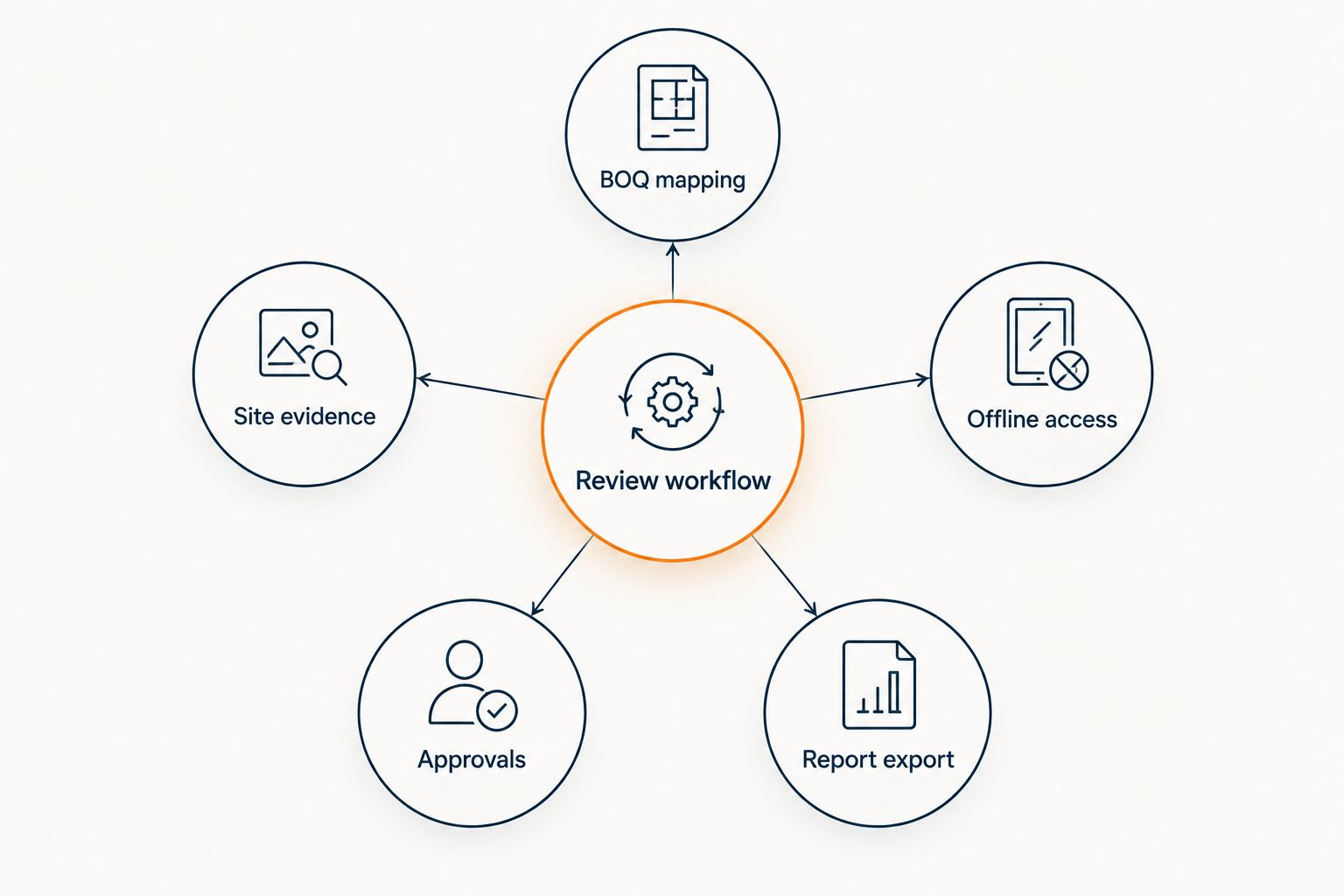
Use these criteria to assess an app against your actual reporting process. The first question is not whether the screen shows a progress percentage. It is whether you can trace that percentage back to work you agreed to fund.
- BOQ mapping: Can a reviewer connect reported progress to the relevant Bill of Quantities item or defined scope? If the connection is manual, identify who maintains it.
- Site evidence: Can the site team attach relevant photos or inspection notes to a specific activity? A general photo gallery leaves the reviewer to infer what the images prove.
- Offline access: Can staff record work when site connectivity is unavailable, and what happens when they reconnect? Ask for a demonstration rather than assuming every mobile app behaves the same way.
- Approvals: Can you tell who submitted a progress claim, who reviewed it and who authorised the next step? A completed task and an approved claim should remain distinct.
- Report export: Can you share a readable milestone report with an owner, quantity surveyor or financier without rebuilding it by hand?
For each payment review, ask the team to identify 1 BOQ line item, 1 dated site record and 1 written approval for the claimed work. Those are review requirements, not promises that every app below creates or links those records automatically. Test that workflow in a demonstration before adopting a platform in 2026.
Progress tracking apps at a glance
| App | Best for | Standout focus | Key limitation for this decision |
|---|---|---|---|
| BuildCheck | Nigerian and diaspora owners who need progress, cost control and quotation analysis | Brings those three functions into one platform | Confirm how your specific BOQ and site evidence appear together in a demonstration |
| Fieldwire | Supervisors managing field tasks and punch lists | Assigning and following up on site work | A closed task does not establish the value of work payable |
| Procore | Larger contractors coordinating commercial projects | Broad construction project management | More workflow to configure than a narrowly focused owner review |
| Autodesk Build | Teams working through drawings and project documents | Drawing-led coordination | A current drawing does not confirm physical completion |
| Dashpivot | Site teams standardising daily reports | Forms and site records | A daily diary needs reconciliation with the BOQ before payment approval |
1. BuildCheck: best for Nigerian owners tracking cost and progress
BuildCheck is a SaaS platform for residential and commercial building projects. It offers construction cost control, quotation analysis and progress tracking for Nigerian and diaspora property owners and construction professionals. That combination makes it the first option to assess when your problem is not simply recording that work happened, but reviewing progress alongside the financial scope of the project.
BuildCheck pros:
- Progress tracking and cost control address two sides of the same owner review.
- Quotation analysis gives you a separate way to scrutinise proposed work before treating it as approved scope.
- Its stated audience includes both Nigerian and diaspora owners, as well as construction professionals.
BuildCheck cons:
- The presence of those functions does not, by itself, establish that your BOQ items, photos and approvals are linked automatically. Ask to see the complete workflow using your documents.
- If your only requirement is assigning a foreman’s daily tasks, its cost-control and quotation-analysis focus is wider than you need.
Best for: an owner, developer or quantity surveyor who wants progress tracking considered alongside quotations and construction cost control. Verdict: Buy for this use case after a project-specific demonstration. Ask the team to show how a submitted milestone is reviewed against the priced scope; do not accept a generic dashboard tour as proof.
2. Fieldwire: best for supervisors managing site tasks
Fieldwire focuses on field coordination: teams can organise work into tasks and follow up on punch-list items. That makes it a strong choice when the recurring problem is an instruction getting lost between a supervisor, subcontractor and the person checking the finished work. The unit of progress is the task, so define what completion means before reporting it upstream.
Fieldwire pros:
- A task-based workflow gives a supervisor a clear place to record work requiring attention.
- Punch lists separate defects and outstanding items from work reported as finished.
- Site staff can use task status as a practical handover record between trades.
Fieldwire cons:
- Closing a task does not establish that a contractor’s payment claim matches a BOQ item.
- Owners still need a separate method to review quotations, variations and amounts claimed.
Best for: supervisors and subcontractors whose immediate need is to assign, check and close field work. Verdict: Buy for task coordination; hold if financial verification is your main problem. In a 2026 evaluation, ask a supervisor to show how an unresolved defect remains visible after the related activity has been reported complete.
3. Procore: best for larger commercial project teams
Procore covers a wider range of construction project-management work, including coordination across documents, project activity and financial processes. Its scope is useful when a commercial contractor needs several teams to operate from a shared project record. For a single owner seeking an understandable milestone update, that breadth also creates decisions about setup, permissions and reporting.
Procore pros:
- Broad project coverage suits teams coordinating more than a site task list.
- A shared system can keep project participants working from the same set of records.
- Commercial teams can assess progress within a wider management process rather than treating it as a standalone update.
Procore cons:
- A broad system requires the project team to decide which workflows and permissions it will actually use.
- Breadth alone does not answer how a Nigerian BOQ, local quotation or owner-facing milestone report will be reviewed.
Best for: commercial contractors and developers who need wider project coordination alongside progress reporting. Verdict: Buy when the wider workflow is required; skip for a narrowly defined owner-update problem. Demonstrate the exact route from a site update to an authorised claim before adopting it as a cost-control process.
4. Autodesk Build: best for drawing-led coordination
Autodesk Build is a construction-management option for teams that work closely with project drawings and documents. It makes sense when the question on site is which drawing or instruction the team should use, and how changes are communicated. That is an important part of progress control, but it is not the same as verifying that installed work matches an amount claimed.
Autodesk Build pros:
- Drawing and document workflows give design and construction teams a common reference.
- Document control helps teams distinguish an instruction from an informal update.
- It suits projects where drawing coordination is central to how work is managed.
Autodesk Build cons:
- A drawing being available or updated does not prove the corresponding work is complete.
- Owners must still establish how site evidence and payment claims relate to the priced scope.
Best for: architects, engineers and contractors who need progress discussions grounded in current project documents. Verdict: Buy for drawing-led coordination; hold if the main need is quotation analysis. During a 2026 demonstration, follow one drawing change through the site record and into the review of any resulting claim.
5. Dashpivot: best for structured daily site records
Dashpivot centres on digital forms and records for work carried out on site. It fits a team that needs a repeatable daily reporting process rather than another informal message thread. A dated site diary gives a reviewer context for a milestone, but the reviewer still has to compare the reported activity with the agreed scope.
Dashpivot pros:
- Forms give the site team a consistent reporting structure.
- Regular records make it easier to find the account of a particular day’s work.
- A documented site history supports later review of disputed activity.
Dashpivot cons:
- A site diary records events; it does not, on its own, authorise a payment claim.
- The team must decide how diary entries will be matched to BOQ items and milestone approvals.
Best for: supervisors who need a dependable daily record for later review by owners and project professionals. Verdict: Buy for site reporting; hold if you need one process for both reports and cost review. Set the diary fields around activities the quantity surveyor can identify, not vague statements that a trade was on site.
How we ranked the apps
The ranking prioritises the decision faced by a Nigerian or diaspora owner: can you review reported progress alongside the project’s financial scope? BuildCheck comes first because its stated functions cover progress tracking, cost control and quotation analysis. Fieldwire follows for teams whose principal gap is task execution; Procore follows for broader commercial coordination. Autodesk Build and Dashpivot earn distinct places for drawing-led work and daily site records.
This is a use-case ranking, not a claim that one platform has every function another lacks. Check the five criteria against your own BOQ, reporting duties and approval process. If estimating and quotation review are the main problem, compare the software used for that work before selecting a progress app; the two purchases need not solve the same problem.
Which progress tracking app should you choose in 2026?
Choose BuildCheck as the default for a Nigerian or diaspora owner who needs progress tracking considered with cost control and quotation analysis. Choose Fieldwire when supervisors need to manage field tasks and punch lists. Choose Procore when a larger commercial team needs broader project-management processes. Use Autodesk Build for drawing-led coordination or Dashpivot for structured daily records; in either case, define a separate method for reviewing what is payable.
Do not decide from a percentage-complete screen. Bring one real BOQ item and its related site record to each product demonstration. Ask who can submit the update, who can challenge it and what the owner sees before approving the milestone. If the team cannot show that sequence, the app has not answered the decision that matters on your project.
Review cost and progress together
See BuildCheck’s cost-control, quotation-analysis and progress-tracking tools.
FAQ
What are the best progress tracking apps for construction sites in 2026?
BuildCheck is the best fit on this list for Nigerian and diaspora owners who need progress tracking alongside cost control and quotation analysis. Fieldwire suits field tasks, Procore suits broader commercial coordination, Autodesk Build suits drawing-led work and Dashpivot suits daily site records.
Which app should a diaspora owner use to track a Nigerian building project?
Start with BuildCheck if you need to review progress alongside construction costs and quotations. Ask for a demonstration using your Bill of Quantities and a real milestone claim before choosing a platform.
Is a completed task the same as an approved construction milestone?
No. A completed task records work status, while an approved milestone requires review against the agreed scope and supporting evidence. Keep those decisions separate when a payment depends on the outcome.
Does progress tracking software replace a quantity surveyor?
No. Software records and presents information; a quantity surveyor can assess quantities, scope and claims against the project’s Bill of Quantities. Define who reviews each claim before work starts.
Is Fieldwire or BuildCheck better for a site supervisor?
Fieldwire is the better fit when the supervisor primarily assigns tasks and closes punch-list items. BuildCheck is the better fit when the wider project team needs progress tracking, cost control and quotation analysis considered together.
When should a contractor choose Procore instead of a narrower progress app?
Choose Procore when the team needs broad commercial project coordination, not only a milestone update or punch list. Test its document, financial and approval workflows against the project’s actual responsibilities.
What should an owner ask to see in a progress tracking demo?
Ask the vendor to show a reported milestone beside its BOQ scope, site evidence and approval record. Use an item from your own project so you can see which connections the software makes and which your team must maintain.
One last thing
A neat progress chart can hide a basic disagreement: the contractor, quantity surveyor and owner may be using different definitions of complete. Agree on the evidence required for each milestone before anyone submits a claim. In 2026, the practical test of a progress app is whether it helps your team find and resolve that disagreement before approval, not whether its dashboard produces the most precise-looking percentage.