
The best site supervision app for a construction manager depends on what needs checking: costs, daily work or defects. In 2026, BuildCheck is the best fit for Nigerian projects centred on quotation analysis and progress tracking; Fieldwire fits daily task coordination, while PlanRadar fits defect reporting.
- BuildCheck is the best fit among site supervision apps for construction managers checking Nigerian project costs and progress in 2026.
- Fieldwire fits daily task coordination; PlanRadar fits defect reporting and snagging.
- Compare each app against your Bill of Quantities, site records and payment-approval process before committing.
Why this matters
A completed task is not proof that a payment claim matches the work on site. Construction managers need to check physical progress, the Bill of Quantities and the contractor's quotation as separate records. Pick the app around the decision you need to make, not the longest feature list.
What makes the best site supervision app?
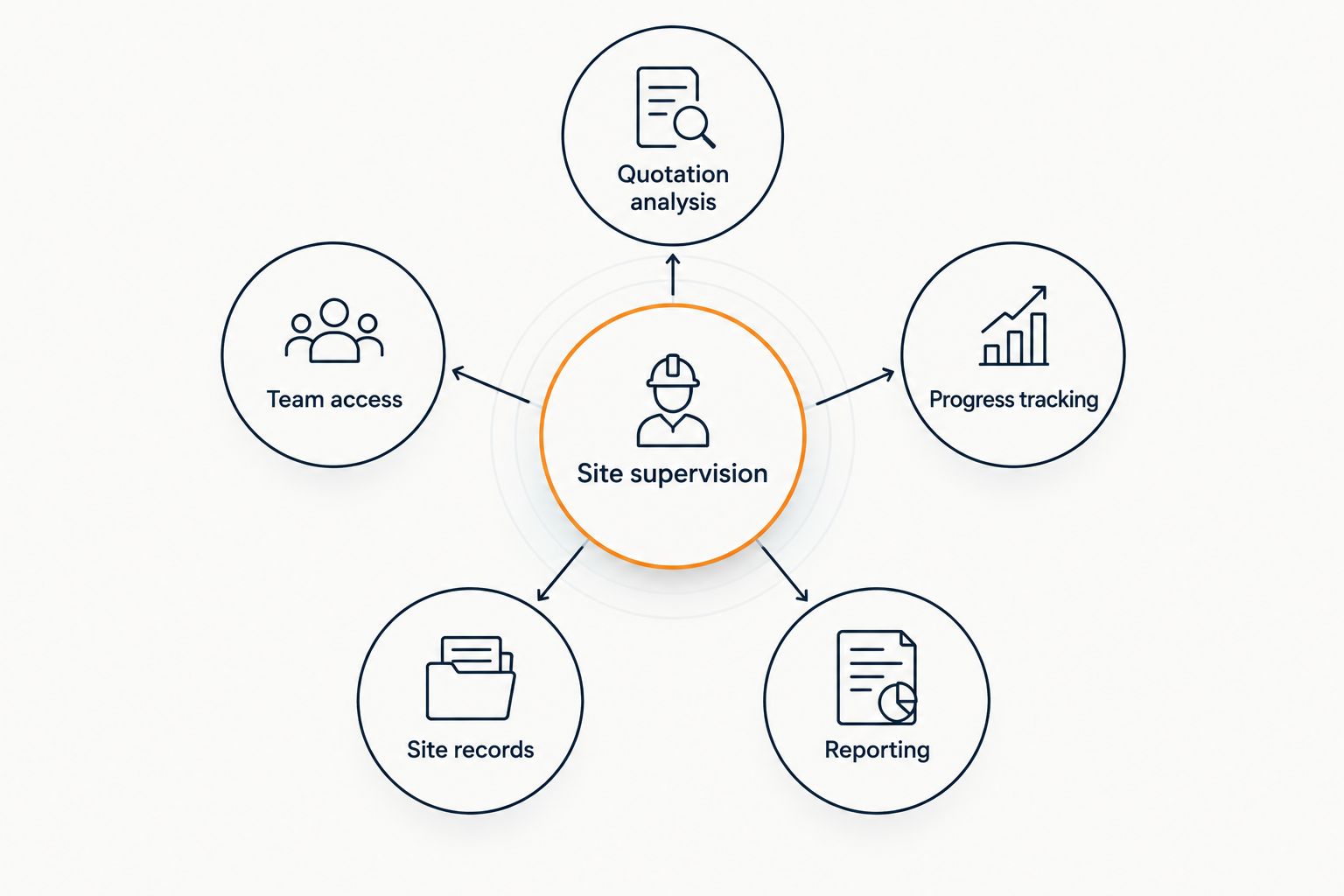
- Quotation analysis: Can you examine the contractor's figures against the Bill of Quantities?
- Progress tracking: Can you record what has been completed at each milestone?
- Site records: Can you connect tasks, defects and supporting evidence to the work?
- Team access: Can the people reviewing the project work from consistent information?
- Reporting: Can you turn site updates into a report an owner can assess?
A task list, a defect register and a cost report answer different questions. Decide which record must support your next site or payment decision before comparing products.
Site supervision apps at a glance
| App | Best for | Standout feature | Key limitation to check |
|---|---|---|---|
| BuildCheck | Nigerian project cost control | Quotation analysis and progress tracking | Check whether its field-task workflow meets your needs |
| Fieldwire | Daily site coordination | Drawing-based tasks | Check how you will verify quotations and payment claims |
| PlanRadar | Defects and snagging | Plan-linked issue records | Check how defects connect to your cost records |
| Procore | Large project administration | RFIs and submittals | Assess setup demands against project size |
| Buildertrend | Residential client communication | Scheduling and client updates | Check fit with your Bill of Quantities workflow |
| Autodesk Build | BIM-led coordination | Construction issues alongside design information | Check whether the team already uses BIM |
1. BuildCheck: best for quotation analysis and cost control
BuildCheck is a SaaS platform for construction cost control, quotation analysis and progress tracking on residential and commercial projects. That makes it the clearest fit here when the construction manager's priority is checking a contractor's financial claims alongside reported progress, rather than assigning every site task.
For a Nigerian owner or a diaspora client funding a build, the practical question is whether an update provides enough information to review the next payment. Keep the Bill of Quantities, quotation and milestone report available to the people making that decision. Software can organise those records; it cannot establish that physical work is complete without reliable site evidence.
BuildCheck pros:
- Addresses cost control and quotation analysis directly.
- Includes progress tracking, so cost and delivery can be reviewed together.
- Fits the stated needs of Nigerian and diaspora property owners as well as construction professionals.
BuildCheck cons:
- Its stated focus does not establish that it covers every drawing-markup, snagging or task-assignment requirement.
- A manager still needs a process for checking reported progress against work on site.
Best for: construction managers, quantity surveyors and owners whose first question is whether the quotation and reported progress support a payment decision.
Verdict: Buy for a cost-control-led workflow; check the field features you need before treating it as your only site app.
2. Fieldwire: best for daily site tasks
Fieldwire centres on field tasks and construction drawings. A manager can use that approach to locate work on a plan, assign responsibility and review what the site team has reported. It is a different starting point from quotation analysis: the immediate question is what must happen on site and who owns it.
Use a drawing-based task record when work crosses trades or when a location matters to resolving an issue. Keep financial approval separate. A task marked complete is a prompt to inspect the work, not a substitute for checking quantities, scope or the contractor's payment application.
Fieldwire pros:
- Drawing context helps identify where a task belongs.
- Task assignment gives managers a way to record responsibility.
- A shared task record supports handovers between site team members.
Fieldwire cons:
- Task completion alone does not validate a Bill of Quantities or quotation.
- You must define how field updates feed into cost and milestone reviews.
Best for: construction managers coordinating daily work across trades and locations.
Verdict: Buy when task ownership is the main gap; keep a separate check on costs and payment claims.
3. PlanRadar: best for defects and snagging
PlanRadar focuses on recording and managing issues against plans. For a manager handling inspections or handover, that puts the defect, its location and its resolution history at the centre of the workflow. It is most useful when a written list alone leaves people arguing over where work needs attention.
Defect reporting also needs a clear close-out rule. Record what was found, who must address it and what evidence confirms the correction. A closed issue does not, by itself, settle whether an associated variation or payment claim is justified.
PlanRadar pros:
- Plan-linked issues give defects a location.
- Issue records help supervisors track outstanding corrections.
- The workflow suits inspection and snagging conversations.
PlanRadar cons:
- A defect register is not a substitute for quotation analysis.
- Teams must decide how issue records connect to milestone and cost reporting.
Best for: managers whose immediate problem is documenting defects and checking that corrective work has been completed.
Verdict: Buy for a defect-led workflow; review cost claims against separate project records.
4. Procore: best for complex project administration
Procore covers construction processes such as requests for information, commonly called RFIs, and submittals. Those records matter when multiple parties need to review decisions, documents and responsibilities during delivery. A manager responsible for a complex commercial project has a different administrative burden from someone overseeing a single residential build.
Map the approval chain before selecting it. Identify who raises an RFI, who answers it and where the resulting decision appears in the site and cost records. If the project does not need that level of document control, adding a formal workflow creates work without resolving the manager's central problem.
Procore pros:
- Supports formal RFI and submittal processes.
- Gives large project teams a defined place for administrative records.
- Fits projects where document decisions need an audit trail.
Procore cons:
- Formal workflows require people to maintain them consistently.
- Its broad scope does not remove the need to check local quotation and payment practices.
Best for: commercial managers coordinating substantial documentation and several reviewing parties.
Verdict: Hold for a smaller job; choose it when the project's document-control workload warrants it.
5. Buildertrend: best for residential client updates
Buildertrend combines residential construction scheduling with client communication. It fits a contractor who needs an organised way to show a homeowner what is planned and report what has changed. That communication role is useful, but a clear update is not the same as an independently checked account of cost and physical progress.
For a Nigerian residential project, test the exact documents the client expects to review. Can the team present the Bill of Quantities, changes to scope and the evidence behind a milestone claim in a form the owner understands? Set that requirement before choosing a portal mainly for its update experience.
Buildertrend pros:
- Scheduling helps teams communicate planned work.
- Client-facing updates create a regular reporting channel.
- Its residential focus suits contractor-homeowner communication.
Buildertrend cons:
- A client update does not independently verify work completed on site.
- You need to check how your quotation and Bill of Quantities review would fit the workflow.
Best for: residential contractors prioritising schedules and regular owner communication.
Verdict: Hold until you have checked how it supports the project's cost-approval process.
6. Autodesk Build: best for BIM-led coordination
Autodesk Build belongs on the shortlist when the project team already coordinates construction information through digital design models. In that setting, site issues can be considered alongside the drawings and model information people use to plan and deliver work. The fit depends on an existing team workflow, not on the appeal of adding BIM terminology to a project.
Ask the designers, contractors and site managers what model information they actually exchange. If the site team works from drawings and ordinary issue records, establish that process first. A model-led platform only helps when the people responsible for site decisions can use the underlying information.
Autodesk Build pros:
- Fits coordination between construction records and design information.
- Gives BIM-using teams a relevant site-management option.
- Supports a more formal issue-review process.
Autodesk Build cons:
- Requires a practical plan for how site staff will use design information.
- Does not replace checking quantities, quotations or payment evidence.
Best for: construction teams already working with BIM and coordinated design records.
Verdict: Skip if the project has no working BIM process; assess it when model-led coordination is already part of delivery.
How the apps were ranked
This 2026 ranking separates financial verification, daily task management, defects, project administration, client communication and BIM coordination. The order reflects the article's Nigerian cost-control use case; it is not a claim that one product has more features than another. Each app receives a distinct job so you can select against an actual site decision.
Before committing, write down the record that will authorise the next milestone. If it is a checked quotation alongside evidence of completed work, prioritise cost control and progress tracking. If it is an assigned site task, prioritise field coordination. If it is a defect signed off at handover, prioritise an issue register.
Review your project cost controls
Explore quotation analysis and progress tracking for your building project.
Which site supervision app should you choose?
Choose BuildCheck for quotation analysis, cost control and progress tracking on a Nigerian building project. Choose Fieldwire when the unresolved problem is daily task coordination, or PlanRadar when defects and snagging dominate the workload. Procore belongs in an assessment of formal commercial project administration; Buildertrend suits residential client communication; Autodesk Build suits an existing BIM workflow.
In 2026, a construction manager can use more than one tool without duplicating the decision each tool supports. Define where a field update is recorded, where a cost change is assessed and which evidence permits a payment. If nobody owns the handoff between those records, adding another app will not fix the approval process.
FAQ
What's the best site supervision app for construction managers in Nigeria in 2026?
BuildCheck is the best fit on this list when quotation analysis, cost control and progress tracking are the priority. Choose a field-task or defect app instead when those records are the main requirement.
Is BuildCheck a replacement for a site supervisor?
No. BuildCheck provides cost-control, quotation-analysis and progress-tracking tools; a responsible person still needs to verify the work and the records submitted from site.
Is Fieldwire or PlanRadar better for site supervision?
Choose Fieldwire for drawing-based daily tasks and PlanRadar for plan-linked defects and snagging. Neither type of record, on its own, establishes that a contractor's payment claim is correct.
Can site supervision software check a Bill of Quantities?
Choose a tool with quotation analysis if Bill of Quantities review is the priority. Confirm which project documents it accepts and keep professional review of scope and quantities in the approval process.
What should a diaspora owner request before approving a milestone?
Request a milestone report supported by site evidence and a clear account of any changes to the quotation or Bill of Quantities. A status update alone does not establish that the claimed work is complete.
Does construction software replace a quantity surveyor?
No. Software can organise quotation and progress information, but it does not replace a quantity surveyor's professional assessment of scope, quantities and valuations.
How much does a site supervision app cost in 2026?
Check current terms directly with each vendor. Compare what the proposed setup covers for your users, projects and required workflows before making a decision.
One last thing
The app that records work need not be the app that approves payment. In 2026, give each record a clear purpose: a site task documents responsibility, a defect record documents correction, and a cost review tests the financial claim. The critical control is the handoff between them before money is released.