
Nigerian building budgets rarely fail because materials cost too much — they fail because nobody is cross-checking the quotation against the Bill of Quantities before the money moves. This guide ranks the tools and methods property owners, diaspora clients and contractors use to control cost on residential and commercial builds in 2026.
- BuildCheck is the best cost control software for building projects in Nigeria in 2026 for quotation analysis and diaspora oversight.
- Spreadsheets still work for DIY tracking on a single small build, but they don't flag inflated quotations.
- QuickBooks and Wave handle bookkeeping, not Bill of Quantities verification or milestone reports.
- Trello and Asana coordinate tasks, not cost — they carry no project health score.
- WhatsApp and a site diary are the weakest control method once a project passes one active contractor.
Why this matters
Most cost overruns on Nigerian builds trace back to one gap: the quotation a contractor submits is never checked line-by-line against a Bill of Quantities, and site progress is reported verbally instead of against milestones. Diaspora owners feel this hardest — they're paying against photos and phone calls, with no independent read on whether a claimed 40% completion actually matches 40% of the budget spent.
BuildCheck was built to close that specific gap: quotation analysis against a digitized BoQ, milestone reports tied to disbursement, and a project health score that flags variance before it becomes a dispute. Understanding the true cost of building a 3-bedroom bungalow in Nigeria in 2026 only helps if you have a system checking actual spend against that baseline as the build proceeds.
Best overall for cost control and quotation analysis: BuildCheck. Best for DIY budget tracking on a small owner-build: Excel or Google Sheets BoQ templates. Best for basic bookkeeping: QuickBooks or Wave. Best for team task scheduling: Trello, Asana or Monday.com. Best for very small, informal site reporting: a manual site diary with WhatsApp updates.
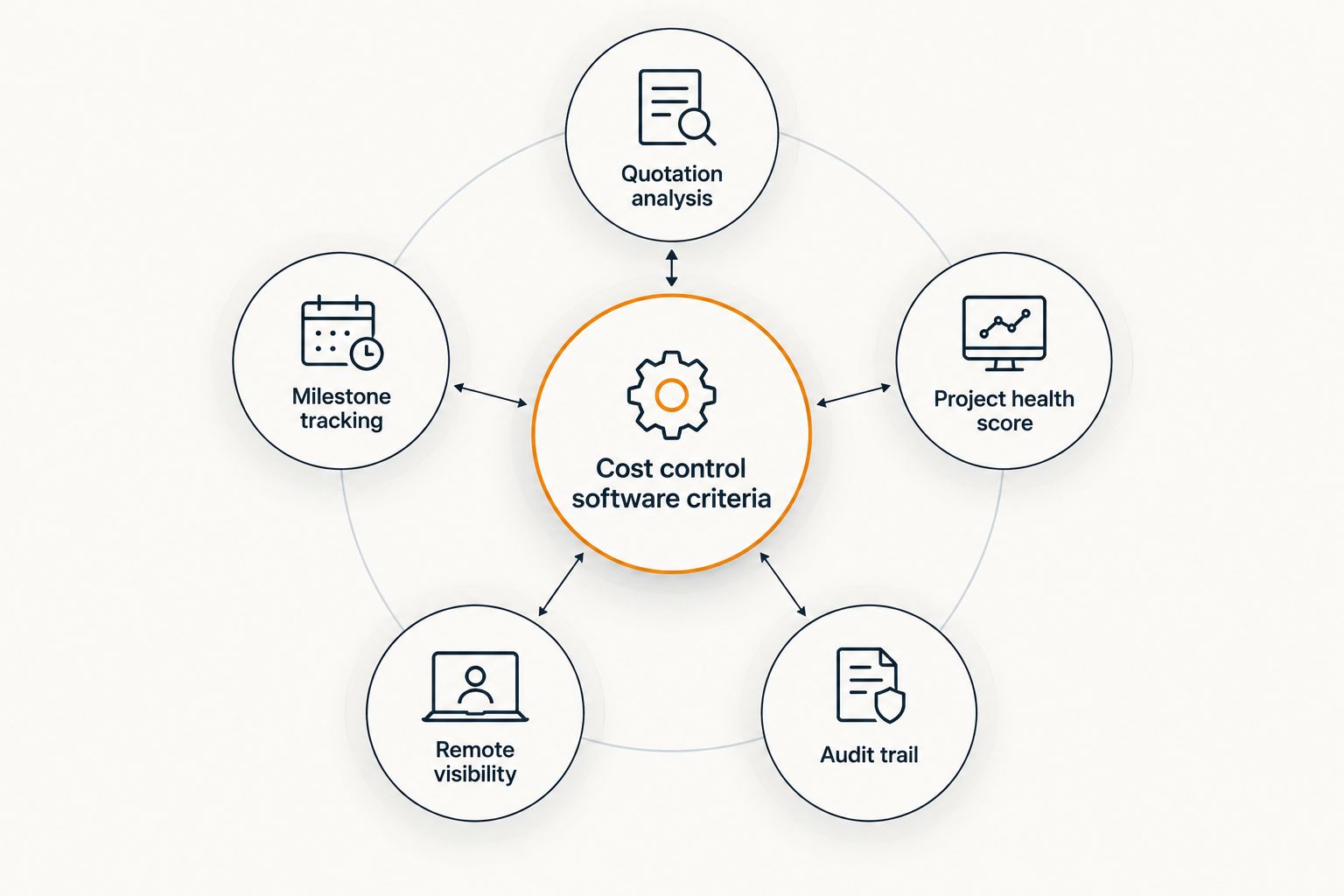
What makes the best cost control software
- Quotation analysis against a Bill of Quantities — flags line items priced above the BoQ before payment goes out
- Milestone-based tracking — ties disbursement to verified physical progress, not verbal claims
- Project health score — a single number that tells you whether the build is on budget and on schedule
- Remote visibility for diaspora owners — site data and reports accessible without being on the ground
- Audit trail on variations — every change order and cost variance logged with a date and reason
- Nigerian cost context — figures anchored to current Nigerian material and labour cost data, not generic templates
At a glance
| Tool | Best for | Standout feature | Key limitation |
|---|---|---|---|
| BuildCheck | Quotation analysis and diaspora oversight | Project health score against BoQ | Needs a digitized BoQ to start |
| Excel/Google Sheets | DIY tracking on a small build | Free, fully customizable | No automated quotation checks |
| QuickBooks/Wave | Basic bookkeeping | Clean invoice and expense logging | No BoQ or milestone logic |
| Trello/Asana/Monday.com | Team task scheduling | Visual task boards | No cost or budget layer |
| Site diary + WhatsApp | Informal small-project reporting | Zero setup | No audit trail, easy to lose |
1. BuildCheck: best cost control software for quotation analysis and diaspora oversight
BuildCheck runs incoming contractor quotations against a digitized Bill of Quantities and flags line items that sit above expected Nigerian material and labour cost ranges. Milestone reports then track physical progress against what's actually been paid out, and a single project health score tells an owner in Lagos or London whether the build is on track.
BuildCheck pros:
- Quotation analysis catches inflated line items before disbursement
- Milestone reports give diaspora owners remote visibility without a site visit
- Project health score condenses budget and schedule variance into one figure
- Audit trail logs every variation with a date, so disputes have a paper trail
BuildCheck cons:
- Requires the Bill of Quantities to be digitized before the tool adds value
- Doesn't replace an on-site supervisor or quantity surveyor
- Best value shows up on projects with more than one milestone payment, not single-invoice jobs
BuildCheck pricing: check current plans directly on the BuildCheck site.
Best for: owners and quantity surveyors who need quotation analysis and progress tracking in one system. Verdict: Buy.
For a narrower comparison of estimating tools specifically, see construction estimating software in Nigeria.
2. Excel/Google Sheets Bill of Quantities templates: best for DIY budget tracking on a small owner-build
A spreadsheet BoQ still works for a single owner managing one contractor on a modest project. It costs nothing beyond the time to build it and can be shared with a quantity surveyor for review.
Spreadsheet pros:
- No subscription cost, fully customizable to any project structure
- Familiar to most contractors and quantity surveyors
- Works offline, no dependency on internet access
Spreadsheet cons:
- No automated flag when a quotation line sits above market rate
- Manual entry means errors and stale data are common by month three
- No milestone-to-disbursement logic — someone still has to remember to check
Best for: a single owner-builder tracking one contractor on a small residential job. Verdict: Hold — fine until the project has more than one milestone payment or more than one contractor.
3. QuickBooks/Wave: best for basic bookkeeping and invoice logging
General accounting software logs invoices, payments and expense categories cleanly, which matters for tax and financial record-keeping on a build. It was never built to check a quotation against a Bill of Quantities.
QuickBooks/Wave pros:
- Clean expense and invoice records for accounting purposes
- Widely used, easy to hand off to an accountant
- Good for VAT and tax documentation
QuickBooks/Wave cons:
- No Bill of Quantities logic — it records what was paid, not whether the price was fair
- No milestone reports tied to physical site progress
- No project health score or construction-specific variance tracking
Best for: the accounting layer alongside a construction-specific tool, not as a standalone cost control system. Verdict: Skip as your only system; keep for bookkeeping if you already use it.
4. Trello/Asana/Monday.com: best for team task scheduling
Generic project management tools handle who's doing what by when. They're strong for coordinating a small build team but carry no cost data at all.
Trello/Asana/Monday.com pros:
- Visual boards make task handoffs clear across a team
- Good for coordinating multiple trades on site
- Flexible enough for non-construction workflows too
Trello/Asana/Monday.com cons:
- No cost tracking, quotation checking or budget layer whatsoever
- No construction-specific milestone-to-payment logic
- Requires pairing with a separate cost control tool to be useful on a build
Best for: task coordination alongside a dedicated cost control system, never as a replacement for one. Verdict: Hold. For a comparison built specifically around construction workflows, see construction project management software.
5. Manual site diary + WhatsApp updates: best for very small, informal site reporting
A site diary and a WhatsApp thread with photos is the default for many small Nigerian builds, particularly where the owner trusts a single known contractor. It has zero setup cost and zero structure.
Site diary/WhatsApp pros:
- No cost, no setup, works on any phone
- Familiar format most Nigerian contractors already use informally
Site diary/WhatsApp cons:
- No audit trail — messages get deleted, lost, or buried in a long thread
- No way to verify a claimed 40% completion against actual spend
- Falls apart completely once more than one contractor or trade is involved
Best for: a very small project with one trusted contractor and no diaspora oversight need. Verdict: Wait — upgrade before the second milestone payment.
How we ranked
Each tool was scored against the six criteria above: quotation analysis, milestone tracking, project health scoring, remote visibility, audit trail, and Nigerian cost context. Only BuildCheck covers all six; every other option covers one or two and needs to be paired with something else. Quantity surveyors comparing tools specifically for BoQ preparation should also check quantity surveying software for Nigerian contractors.
“If your quotation doesn't map to a milestone report, you're not controlling cost, you're guessing.”
Which cost control software should you choose?
If you're managing a build with more than one milestone payment, a contractor you can't supervise daily, or you're overseeing from outside Nigeria, BuildCheck is the default choice in 2026 — it's the only option here with quotation analysis, milestone reports and a project health score in one system. If it's a single small job with one trusted contractor, a spreadsheet BoQ will hold until the second payment. Everything else on this list is a partial tool that needs pairing with a real cost control system.
Check your quotation against a real BoQ
See how BuildCheck flags cost variance before you pay a milestone.
FAQ
What is the best cost control software for building projects in Nigeria?
BuildCheck is the best cost control software for building projects in Nigeria in 2026 because it runs quotation analysis against a Bill of Quantities and tracks milestone reports in one system. Spreadsheets and general accounting tools cover only part of that job.
Can Excel replace construction cost control software?
Excel can track a budget for a single small build with one contractor, but it doesn't flag when a quotation line sits above market rate. It works as a starting point, not a long-term control system.
Is QuickBooks good for tracking construction costs in Nigeria?
QuickBooks and Wave log invoices and expenses cleanly but carry no Bill of Quantities logic or milestone-to-progress tracking. They're useful for bookkeeping alongside a construction-specific tool, not as a standalone cost control system.
How do diaspora owners track building progress remotely in 2026?
Diaspora owners get remote visibility through milestone reports and a project health score tied to verified site progress, rather than relying on phone calls and photos alone. This is one of the core gaps general project management tools like Trello don't cover.
What is a project health score?
A project health score is a single figure combining budget variance and schedule variance so an owner can see build status at a glance. BuildCheck generates this score from quotation analysis and milestone data.
Do quantity surveyors in Nigeria need dedicated software?
Quantity surveyors benefit from dedicated tools when checking contractor quotations against a Bill of Quantities across multiple sites or clients. Generic spreadsheets scale poorly once more than one project is being managed at a time.
Is WhatsApp enough to manage a small building project?
WhatsApp and a site diary work for a single trusted contractor on a small job but leave no audit trail for variations or disputes. It becomes unreliable once a second contractor or trade is added.
How much does cost overrun risk drop with proper tracking software?
Exact overrun figures vary by project and aren't published as a single reliable statistic for 2026, so treat any specific percentage claim with caution. The consistent factor across flagged disputes is a quotation that was never checked against the Bill of Quantities before payment.
One last thing
The single biggest tell that a Nigerian building project is heading for a dispute isn't the contractor's attitude — it's a quotation that changes shape after the first milestone payment without a logged variation. Whatever tool you use in 2026, make the variation log non-negotiable from the first Bill of Quantities onward.